
YouTube Audience Retention: Keep Viewers Watching
Your video got the click. But did viewers stay? That's the difference between a video the algorithm pushes and one it buries.
In 2026, retention matters more than ever. YouTube's algorithm now weighs retention and session time 3x more than click-through rate. A video that gets clicked but abandoned within 30 seconds hurts your channel. A video that keeps viewers engaged? That's what YouTube wants.
Understanding Your Retention Metrics
The retention curve in YouTube Studio tells you everything. It shows exactly where viewers leave—and those drop-off points are your roadmap to improvement.
First 30 seconds is everything. If you lose viewers here, nothing else matters. Target 65-75% retention at the 30-second mark. Below 60% means your hook needs work.
Average Percentage Viewed (APV) shows what percentage of your video the average viewer watches. For long-form, aim for 50%+. For Shorts, you need 75%+.
Session time is the hidden metric. YouTube measures what happens after your video ends. Viewers who close YouTube? Bad signal. Viewers who click to another video? Great signal. Use end screens and playlists to keep them watching.
What a Healthy Retention Curve Looks Like
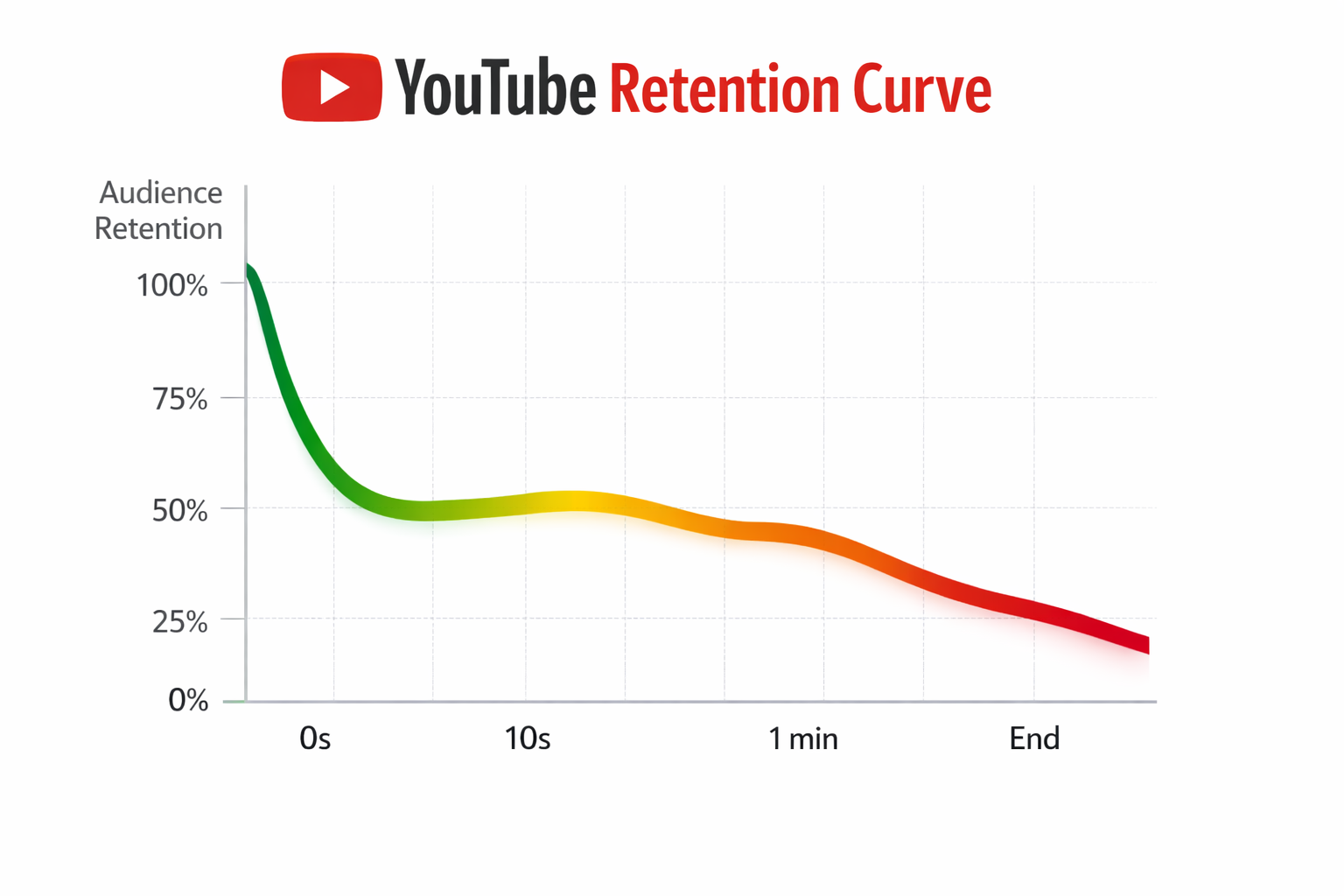
Expect a 15-25% drop in the first 10 seconds—this filters people who weren't your target audience. That's normal. What matters is what happens next.
The curve should stabilize between 10-60 seconds. If you're losing another 15% here, your hook isn't delivering. Strong hooks see the curve flatten or even rise slightly.
Through mid-video, expect 1-2% loss per minute. Steeper drops signal pacing problems. Many successful videos see retention tick up in the final 10-20 seconds as viewers return for conclusions.
Red flags: A 40%+ drop in first 30 seconds means your hook failed. Repeated sharp drops throughout mean jarring transitions. A sudden 20%+ drop mid-video means something specific went wrong at that exact moment.
📊 See exactly where viewers leave. GeniusTube analyzes your retention curves and identifies specific drop-off points with actionable fixes. Analyze your videos free →
The First 30 Seconds: Your Make-or-Break Moment
YouTube's algorithm gives maximum weight to the first 3-5 seconds. This is when viewers decide whether your content is worth their time.
Start with your hook, not your intro. Cut the "hey guys, welcome back to my channel" completely. Start mid-action, mid-sentence, or with your most compelling statement.
Show the result first. Promise your viewers will learn to code? Show the finished app immediately. Then explain how to build it.
Pattern interrupt every 5-8 seconds. Change camera angles, add text overlays, cut to B-roll. When nothing changes for more than 8 seconds, attention drops significantly.
Front-load your value. State the key insight within the first 15 seconds. "The #1 mistake killing your retention is..." works better than building up to it.
Good hooks challenge assumptions ("Everything you know about [topic] is wrong"), hit pain points directly ("I wasted $10,000 learning this. You don't have to."), or create curiosity gaps ("There's one thing top creators do that you don't...").
Mid-Video: Keeping Viewers Hooked
Pattern interrupts are your secret weapon. Change something visual or informational every 7-10 seconds. This isn't about ADHD-friendly editing—it's about how human attention actually works.
Visual changes include camera switches, B-roll cuts, graphics, and text overlays. Informational shifts mean new subtopics, questions to your audience, or surprising statistics. Even audio changes—music shifts, strategic silence—help maintain attention.
For longer videos (15+ minutes), use mini-hooks throughout. Drop new information at the 5-minute mark. Change format or location around 12 minutes. Tease upcoming content to keep viewers curious.
Add 5-8 chapter markers per video with searchable titles. Chapters increase recommendation matching and allow viewers to jump to interests, which paradoxically increases overall watch time.
End Screen Strategy
Most creators slap end screens on randomly. Timing matters.
Start your end screen in the last 20 seconds of video. Include your subscribe button (top-right, least intrusive), your highest-retention related video (not your newest), and a playlist to encourage binge-watching.
The closing formula: summarize key takeaways in 5-10 seconds, reinforce the value they received, ask a question to drive comments, then point to the next video during the end screen. Skip the long goodbyes and multiple competing CTAs—they just drive viewers away.
Retention by Content Type
Tutorials (8-15 minutes): Show the outcome immediately, then work backward. Add chapters for each step. Include a "common mistakes" section—viewers stay to avoid errors. Target 60%+ midpoint retention.
Vlogs (10-20 minutes): Start with the most exciting moment, not the beginning of your day. Create narrative tension. The best vlogs feel like stories, not chronologies. Target 50%+ midpoint retention.
Gaming (15-30 minutes): Edit out boring parts—loading screens, repeated deaths. React genuinely. Create storylines across episodes. Target 45%+ midpoint retention.
Product reviews (8-15 minutes): Give your verdict first. Counter-intuitive, but it works—viewers stay to see if they agree. Then do the deep dive. Target 55%+ midpoint retention.
Analyzing Your Data
Open YouTube Studio > Analytics > Audience Retention. Find the sharp drops. Hover to see the exact timestamp. Then watch those moments in your video.
The 30 seconds before each drop tells you what went wrong. Was it a slow transition? Repetitive content? A boring explanation?
Look for patterns across videos. If every video drops at 1:30, your intro is too long. If drops happen mid-video consistently, your pacing needs work.
📈 Get specific recommendations. GeniusTube analyzes your retention curves and identifies specific issues with actionable fixes. Analyze your retention →
Quick Wins
Cut your intro in half. If it's longer than 10 seconds, it's too long.
Show your best moment first. Don't save it for the end.
Add chapters. Takes 2 minutes, increases watch time significantly.
Remove repetitive sections. Viewers notice and leave.
Add captions. Increases completion rate significantly.
Match your thumbnail promise in the first 30 seconds. Clickbait without delivery kills retention.
The Benchmarks
First 30 seconds: 65-75% is good, 80%+ is excellent.
Mid-video: 40-50% is good, 50%+ is excellent.
Completion rate: 30-40% is good, 40%+ is excellent.
These vary by content type. Gaming naturally has lower retention than tutorials. Compare to your channel average, not global benchmarks.
Conclusion
Retention isn't about tricking viewers into watching longer. It's about delivering enough value that they want to stay.
Start with your hook. Cut everything that doesn't deliver value. Change something every 7-10 seconds. End with a clear next step.
Most importantly: analyze your retention graphs. The data tells you exactly what to fix. You just have to look.
Want to see exactly where your viewers leave? GeniusTube analyzes your retention curves and identifies specific issues with actionable recommendations. Try it free →
FAQ
What's a good retention rate for YouTube videos? For long-form content, aim for 50%+ average percentage viewed. First 30 seconds should retain 65-75% of viewers. These vary by niche—compare to your channel average.
Why is my YouTube retention so low? Most common causes: weak hook (first 30 seconds), slow pacing, repetitive content, or thumbnail/title mismatch. Check your retention graph—the drop-off points tell you exactly where the problem is.
Does YouTube care more about watch time or retention? In 2026, retention percentage matters more than total watch time. A 10-minute video with 60% retention outranks a 20-minute video with 30% retention.
How do I improve my hook? Start mid-action, not with an intro. Show results first, then explain. Use pattern interrupts in the first 5 seconds. Match your thumbnail's promise immediately.